> For the complete documentation index, see [llms.txt](https://okpos.gitbook.io/okpos/llms.txt). Markdown versions of documentation pages are available by appending `.md` to page URLs; this page is available as [Markdown](https://okpos.gitbook.io/okpos/kiosk/undefined-1/26.md).

# 상품 터치키 빈 칸 넣기

2025\. 12. 30 update

<figure><img src="https://684490627-files.gitbook.io/~/files/v0/b/gitbook-x-prod.appspot.com/o/spaces%2Fv69WyUBA97LF6ssfVxBb%2Fuploads%2FrkkOTqhps6H6w1MVlVdN%2Fcta_%EC%83%81%ED%92%88%ED%84%B0%EC%B9%98%ED%82%A4%EB%B9%88%EC%B9%B8%EB%84%A3%EA%B8%B0.png?alt=media&amp;token=230050ec-e345-48d9-ac84-b54a4a718566" alt=""><figcaption></figcaption></figure>

### 🛠️설정 방법

<figure><img src="https://684490627-files.gitbook.io/~/files/v0/b/gitbook-x-prod.appspot.com/o/spaces%2Fv69WyUBA97LF6ssfVxBb%2Fuploads%2FRtOL7o177OJ0h5BpOVSu%2F1.png?alt=media&amp;token=cd9137c8-2e59-4cf1-8bd7-cfef80c9b443" alt=""><figcaption></figcaption></figure>

①   **가맹점 권한으로 asp(웹정보**)에 접속하세요

②   **기초관리>키오스크관리(New KIOSK)>키오스크 터치키관리** 이동

<figure><img src="https://684490627-files.gitbook.io/~/files/v0/b/gitbook-x-prod.appspot.com/o/spaces%2Fv69WyUBA97LF6ssfVxBb%2Fuploads%2FIKtRGscWK2sWrcp1btpN%2F2.png?alt=media&amp;token=69931476-eb8f-4893-bd58-70f751253b43" alt=""><figcaption></figcaption></figure>

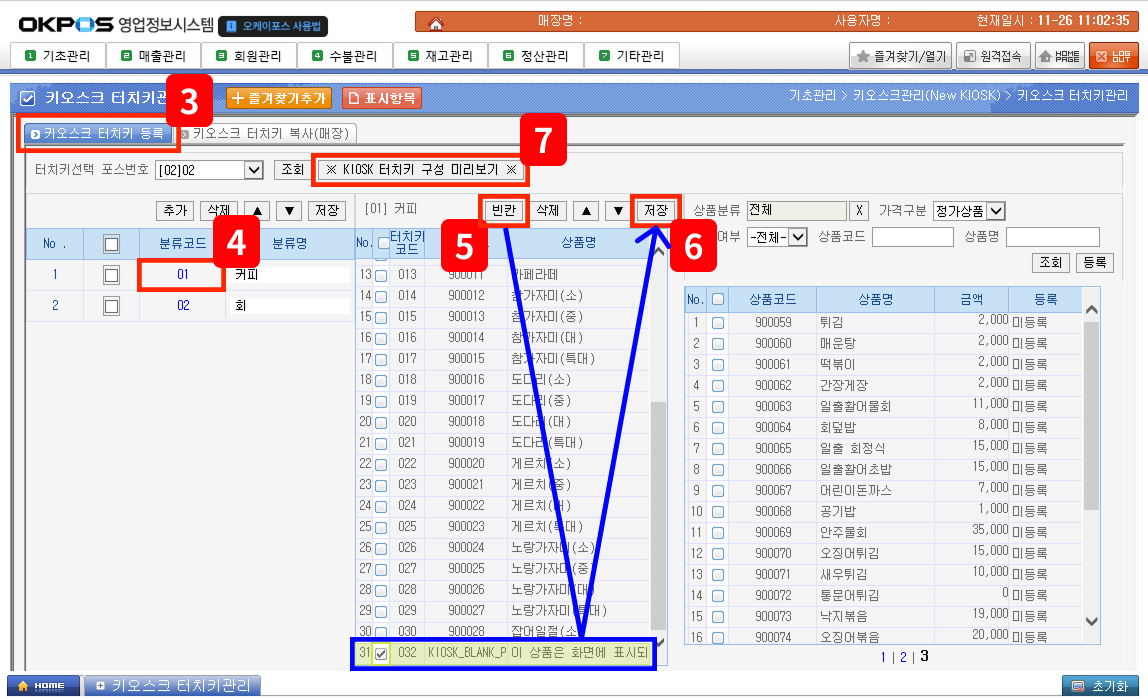
③ **키오스크 터치키 등록 TAB** 선택

④ 빈칸을 생성할 분류 코드를 선택하세요

⑤ **\[빈칸]**&#xC744; 눌러서 **새로운 상품이 생성 됐는지 확인**하세요

&#x20;   <mark style="color:red;">**\*빈칸을 넣고 싶은 만큼 생성해야 해요**</mark>

⑥ **\[저장]** 클릭

⑦ 빈칸 상품을 터치키에 적용하기 위해 이동하세요

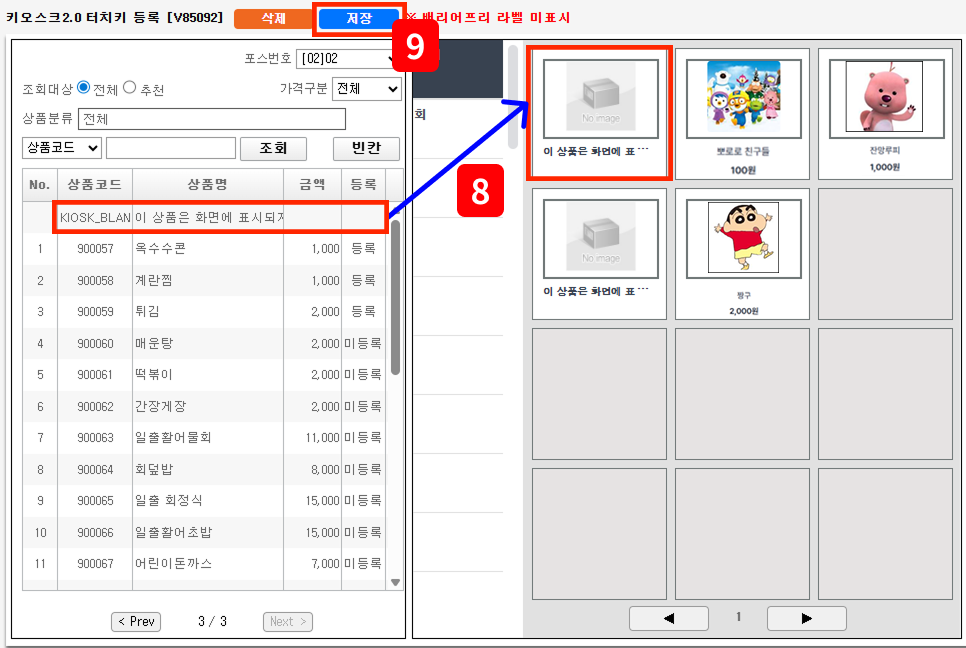
<figure><img src="https://684490627-files.gitbook.io/~/files/v0/b/gitbook-x-prod.appspot.com/o/spaces%2Fv69WyUBA97LF6ssfVxBb%2Fuploads%2FiVUQKEYHo8mugKDbDjGP%2F3.png?alt=media&amp;token=8e1d6db2-af9e-4c53-b4f9-63fcd0f0c547" alt=""><figcaption></figcaption></figure>

⑧ 생성된 **빈칸 상품을 드래그하여 원하는 위치에 배치**하세요

⑨ 저장 후 **KIOSK 프로그램 재시작**

***

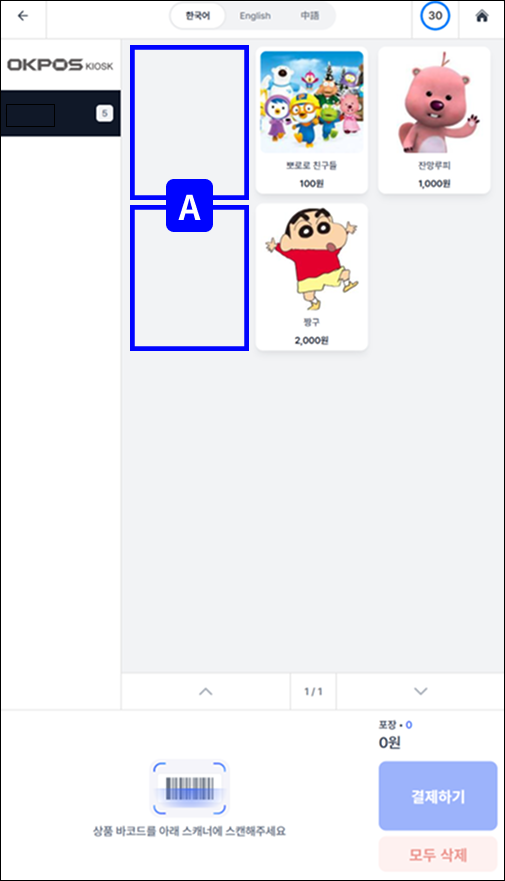
### 🖥️ 적용 후 화면 미리보기
<figure><img src="https://684490627-files.gitbook.io/~/files/v0/b/gitbook-x-prod.appspot.com/o/spaces%2Fv69WyUBA97LF6ssfVxBb%2Fuploads%2FXlxe7Ipw5uXLxxVUOi22%2F4.png?alt=media&amp;token=d3f7cb54-ff18-463f-812c-5b7b932eeed9" alt=""><figcaption></figcaption></figure>