> For the complete documentation index, see [llms.txt](https://okpos.gitbook.io/okpos/llms.txt). Markdown versions of documentation pages are available by appending `.md` to page URLs; this page is available as [Markdown](https://okpos.gitbook.io/okpos/table_qr_pay/undefined.md).
# 알림톡 사용하기
마지막 업데이트 2025.03.27 입니다.
### 💁♀️**알림톡**(카카오알림톡)이란 ?
알림톡은 고객이 주문을 완료한 후, 주문이 정상적으로 접수되었는지 확인할 수 있게 도와주는 역할을 합니다. 기존에는 고객이 포스에서 주문을 하면 사장님이 "네, 곧 준비해 드릴게요"라고 주문 확답을 주고, 고객은 그에 맞춰 기다리면 되었어요.
하지만 요즘에는 **키오스크**나 **QR 오더** 서비스를 통해 주문을 받는 매장이 많아졌습니다. \
이 경우, 고객은 주문 후 "방금 커피 주문이 잘 접수되었나요?" 하는 문의를 사장님께 따로 해야 하는 상황이 발생할 수 있습니다.
이럴 때 알림톡을 활용하면, 고객이 주문 접수 상태를 바로 확인할 수 있기 때문에 불필요한 문의 없이 안심하고 기다릴 수 있으며, 상품 준비 완료 후에도 큰소리로 고객을 호출할 필요 없이 알림톡으로 고객을 호출 할 수 있습니다.
✅**키오스크에서:** 주문 시 알림톡으로 주문완료, 상품준비완료 안내\
✅**QR오더에서**: 주문 시 알림톡으로 주문완료, 상품준비 완료 안내\
✅ **포스에서**: 선불제 포스에서 주문 시 알림톡으로 주문완료, 상품준비완료 안내\
(후불제 포스 사용 시 알림톡 사용 불가)
* 전화번호는 고객의 소중한 개인정보이며, 알림톡 받을 전화번호 수집에 대한 동의 과정이 필요
* 개인정보 이용동의 체크 결과: ‘알림톡 받을 전화번호’를 고객이 주문기계를 통해 직접 입력 시 동의됨
***
### 💁♀️알림톡 이용조건과 기능
#### 1️⃣알림톡 이용 조건
① 알림톡은 오케이포스 영업정보시스템에서 SMS 충전하여 사용합니다.
* 예) 500통: 7,500원 (부가세 별도)
② 알림톡은 1고객당 2통이 자동 발송되며, 주문+호출이 기본 값으로 수정 불가합니다.
#### 2️⃣ 알림톡 기능과 설명
| 상황 | 기능 및 설명 | 예시 이미지 | |
|---|
| 주문 | 주문 접수 확정 | 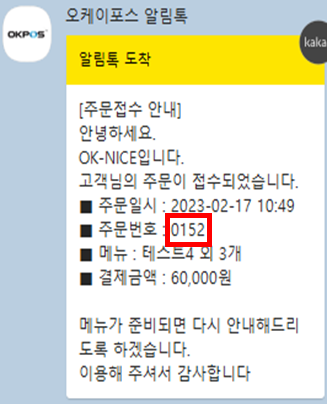
| |
| 호출 | 상품 준비 완료 후 호출 | 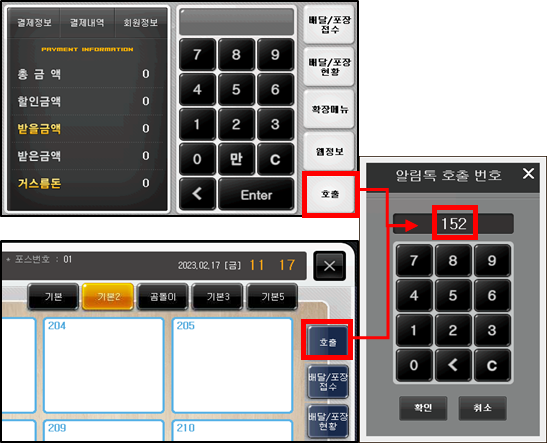
| |
| 재호출 | 호출 후 고객이 오지 않을 기능 때 재호출 | 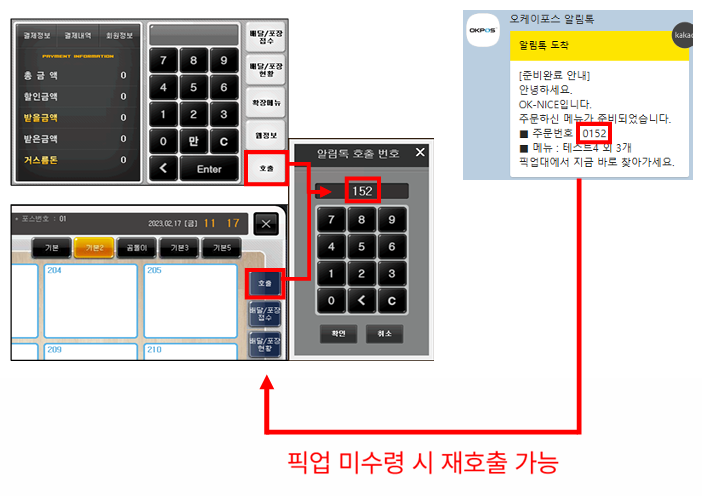
| |
***
### 💁♀️알림톡 사용신청 프로세스
#### 1️⃣ 가맹점은 \[관리대리점]을 통해 신청하세요
#### 2️⃣ 대리점은 \[ 알림톡 ASP 설정(대리점)]를 통해 가이드를 확인하세요
{% content-ref url="/pages/zNOWwS68LROLf46UKmxc" %}
[알림톡 ASP 설정 (대리점)](/okpos/table_qr_pay/undefined/asp.md)
{% endcontent-ref %}
3️⃣ 알림톡 FAQ
{% content-ref url="/pages/rG7QTJbOZvbyOZxYlkEA" %}
[알림톡 FAQ](/okpos/table_qr_pay/undefined/faq.md)
{% endcontent-ref %}
***